ThermRack · Thermal Intelligence

Thermal Visibility That Improves
Efficiency and Reliability

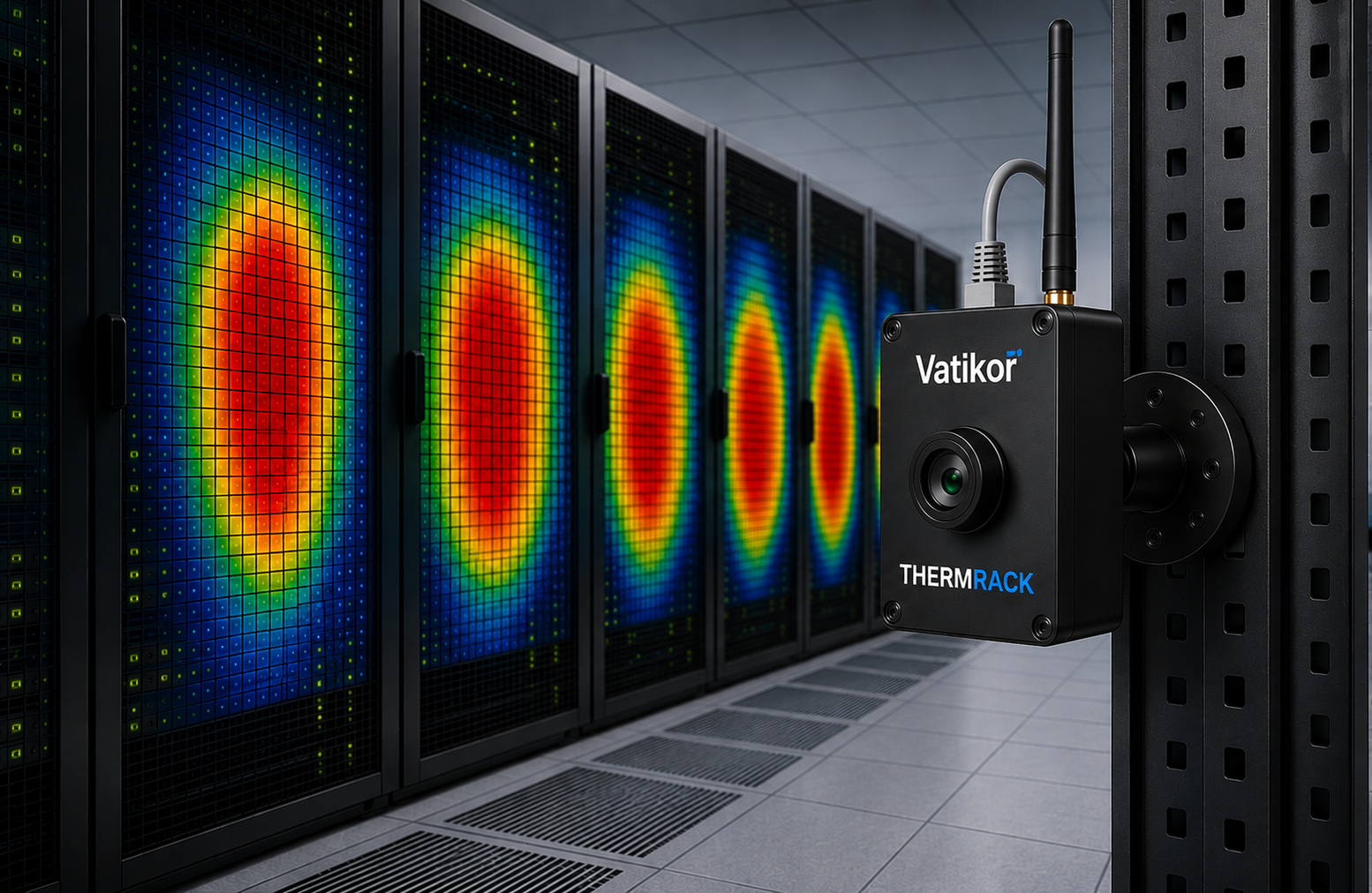
ThermRack delivers real-time thermal intelligence to optimize cooling, reduce energy costs, and improve data center reliability.

Hot Air Bypass Detection
Overcooling Detection
Undercooling Detection
Airflow Assurance
Why ThermRack

Why Data Centers Choose ThermRack

Seven reasons facility and IT teams choose ThermRack for thermal intelligence.

01 / 07

Save Cooling Energy.

Most data centers over-cool by 20–40% because they can't see where the cold air actually goes. ThermRack pinpoints overcooling zones in real time, so you can reduce CRAC output, raise set-points confidently, and cut cooling energy spend without risking equipment.

02 / 07

Increase Data Center Efficiency.

Understand exactly how heat is distributed across every row and rack. Rebalance loads, improve airflow containment, and identify underutilized capacity, turning thermal visibility into measurable PUE improvements.

03 / 07

Simple, Non-Invasive Installation.

Wireless cameras mount on or between racks in minutes, no cabling runs, no server shutdowns, no specialist trades. The edge computer connects to your existing LAN. Your IT or facilities team handles the entire deployment without disrupting a single workload.

04 / 07

No Cloud. Fully Secure On-Premise.

All thermal data is processed and stored on the local edge computer. Integration runs directly to your BMS via BACnet TCP/IP over your internal network. No internet dependency, no external data exposure, no cloud subscription, your data never leaves the building.

05 / 07

Modular and Scalable.

Start with one zone, one row, or one room, and expand without changing your core infrastructure. Add cameras as your data center grows. ThermRack scales from a single cage to a multi-row floor with no rework to the gateway or edge computer.

06 / 07

3D Thermal Map Visualization.

See temperature distribution across your racks as a live three-dimensional heatmap. Every camera feeds a continuous spatial view, cold aisles, hot aisles, bypass zones, and developing hotspots rendered visually so your team understands the full thermal picture at a glance.

07 / 07

Actionable Insights, Not Raw Data.

ThermRack doesn't just collect temperatures, it interprets them. Hot air bypass events, overcooling waste, thermal trend alerts, and capacity headroom are surfaced as clear dashboard metrics. Your team gets answers, not spreadsheets, so action follows insight immediately.

03 · System Architecture

A Complete Thermal Intelligence Network

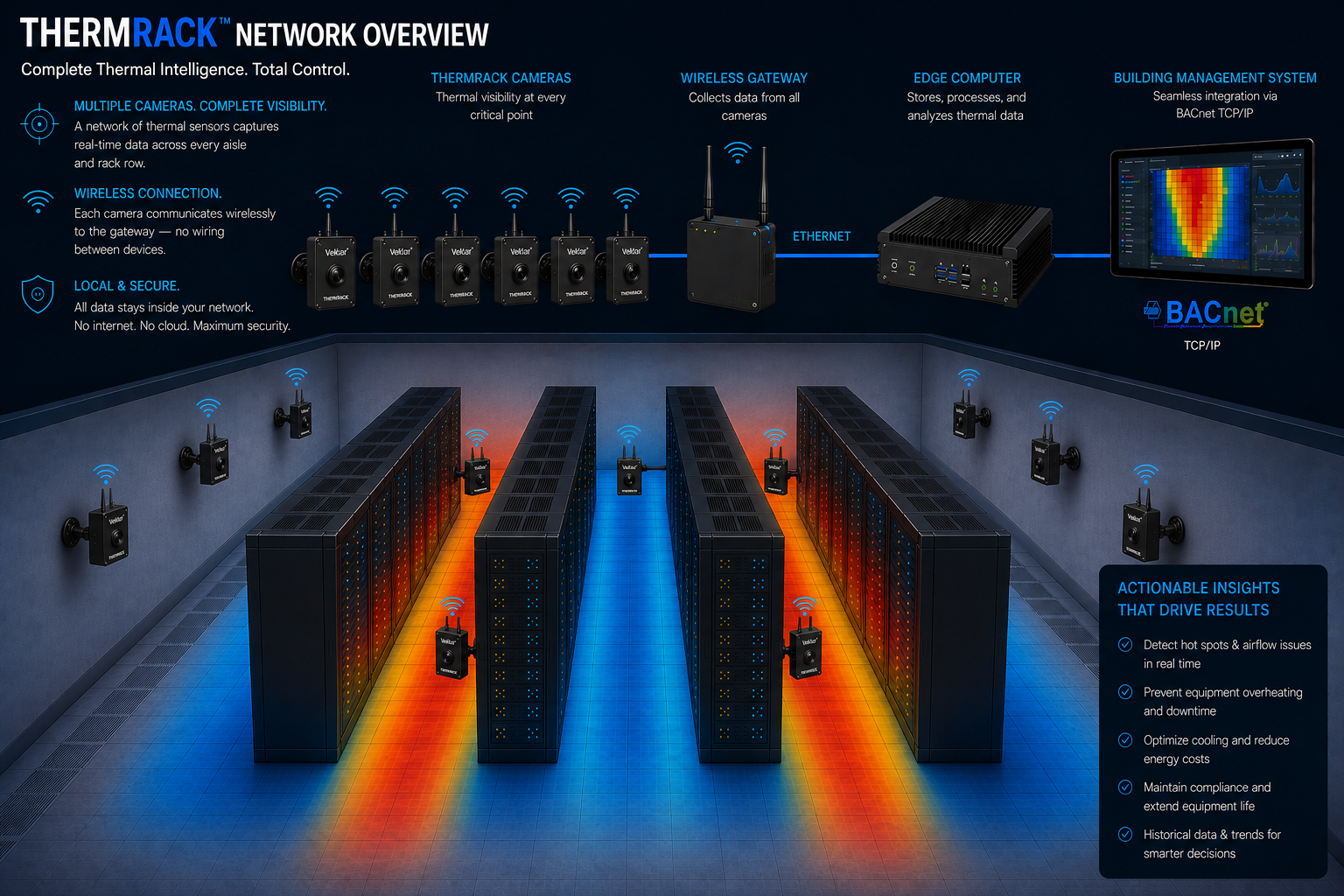
ThermRack is a purpose-built system: wireless thermal cameras feed a gateway, which connects to an on-premise edge computer that stores all data locally and integrates with your BMS via BACnet TCP/IP. No cloud. No external dependencies. Full control stays with you.

  • Camera Wireless thermal cameras mount magnetically on rack doors in minutes. Power over Ethernet, one cable for power and data. Continuously streams thermal frames to the gateway.
  • Gateway Receives wireless data from all cameras in the network and forwards it via Ethernet to the edge computer. Supports multiple cameras per gateway for scalable deployments.
  • Edge Computer Processes all thermal data locally. Runs the ThermRack analytics engine, detecting hot air bypass, overcooling, undercooling, and airflow anomalies in real time. Stores full history on-premise.
  • BMS Integration Delivers actionable thermal insights to your Building Management System via BACnet TCP/IP. Seamlessly integrates with existing DCIM and automation platforms.
ThermRack system architecture: cameras connect wirelessly to gateway, then Ethernet to edge computer, then BACnet TCP/IP to BMS
Actionable Insights

Alerts That Tell You Exactly What to Fix

ThermRack continuously analyses your thermal data and surfaces specific, actionable alerts, delivered directly to your BMS the moment a condition is detected.

Alert Live · Now

Hot Air Bypass Detected

Row B · Racks 12–16

Hot exhaust air is re-entering the cold aisle intake through unsealed rack gaps. CRAC Unit 3 efficiency reduced by ~18%. Containment breach confirmed in Row B rear panel.

Action   Inspect and seal rear rack gaps + blanking panels in Row B
Advisory Live · 2 min ago

Overcooling Detected

Zone A · Cold Aisle

Supply air temperature 9°C below rack inlet target. CRAC units operating at 145% of required capacity. Estimated energy waste: ~$340/month at current load.

Action   Raise CRAC set-point by 4°C in Zone A, no thermal risk at current load
Warning Live · 5 min ago

Low Airflow Detected

Row D · Rack 08

Cold aisle static pressure below threshold. Insufficient cold air reaching server inlets, rack temperatures trending upward at 1.2°C/hr. Likely cause: blocked floor tiles or missing blanking panels.

Action   Inspect floor tile placement and blanking panels in Row D
Warning Live · 8 min ago

Undercooling Detected

Server Room 2 · Rack 22

Rack exhaust temperature at 43°C and rising. Cooling capacity insufficient for current heat load. Equipment thermal protection may activate if unaddressed within 20 minutes.

Action   Increase CRAC output in Server Room 2 or redistribute rack load
Capabilities

Applications

Contact

Ready to See Every Degree
in Your Data Center?

Every facility is different. ThermRack deploys in minutes and adapts to any rack environment, from a single server room to a multi-row enterprise data center.

Company Vatikor
Location Ontario, Canada
Product ThermRack · Thermal Intelligence
Integration BACnet TCP/IP · BMS Ready